2026-11-07 · 15 min read
Deployment Strategies: Blue-Green, Canary, Feature Flags, and More
A practical guide to deploying software safely, comparing deployment strategies, minimizing risk, and choosing the right approach for your team.

Shipping a change to production sounds simple: build it, deploy it, and move on. But what happens when the new version breaks checkout for thousands of customers? What if it works in staging but slows down under real traffic? And what if you want only a handful of users to try it before everyone else?
These are not just testing problems. They are release engineering problems. A good deployment strategy helps you limit the blast radius of a mistake, observe how a change behaves in production, and recover without turning every release into an incident.
In this article, we'll explore the most useful deployment and release strategies, when to choose each one, and how they help engineering teams ship with confidence.
Deployment is not the same as release
Before we compare strategies, let's separate two ideas that often get mixed together:
- Deployment means putting a new version of software into an environment where it can run.
- Release means making that software or a particular feature available to users.
You can deploy code on Tuesday and enable the feature on Thursday. You can also release a feature to 2% of users without deploying a new build that day.
That distinction matters because blue-green, rolling, and canary deployments primarily control how application versions are introduced, while feature flags primarily control who can access particular behavior. They can work together.
What should you consider before choosing a strategy?
There is no universally best strategy. A small internal dashboard and a high-traffic payment service should not necessarily be deployed the same way.
1. How expensive is failure?
A broken marketing page is inconvenient. A broken payment flow can cost money, create inconsistent transactions, and damage trust. Higher-impact changes deserve smaller exposure, stronger verification, and faster recovery options.
2. Can the application run multiple versions simultaneously?
Rolling and canary deployments often mean old and new versions serve traffic at the same time. That requires compatible APIs, events, database schemas, and session handling. If version coexistence is unsafe, a different rollout plan or a compatibility migration is needed.
3. How quickly must you recover?
Ask whether rollback means changing a router configuration, redeploying an older build, turning off a flag, or restoring data. These actions have very different recovery times. A rollback plan is only real if it has been tested.
4. How much infrastructure can you afford?
Blue-green can require two complete production environments, at least temporarily. Rolling deployments usually reuse existing capacity, although extra headroom may still be necessary. Canary deployments need traffic-routing and measurement capabilities.
5. Can you tell whether the release is healthy?
A progressive rollout without observability is just a slow rollout. Before exposing more users, decide which signals matter: error rate, p95/p99 latency, saturation, conversion, payment success, or another business-critical metric.
6. What kind of change are you shipping?
A UI experiment, a stateless service update, a schema migration, and a new recommendation model have different risks. Sometimes the right answer is to combine strategies instead of selecting one.
A quick decision guide
| Situation | Good starting point | Why |
|---|---|---|
| Small internal tool; brief downtime is acceptable | Recreate | Simple to operate |
| Routine stateless service updates | Rolling | Reuses capacity and avoids a full cutover |
| Major application upgrade requiring a fast traffic rollback | Blue-green | Keep the previous environment ready |
| Risky change that needs validation against real user traffic | Canary | Limit exposure and expand gradually |
| Feature should be enabled for employees or beta users first | Feature flags | Separate deployment from feature availability |
| Two UX variants need a controlled comparison | A/B testing + feature flags | Assign users to stable experiment groups |
| New backend needs real production request patterns without user-visible responses | Shadow traffic | Compare behavior before serving results |
| Multi-region service with regional failure concerns | Regional or ring-based rollout | Contain failures geographically or by cohort |
These are starting points, not rigid rules. Let's look at the mechanics and trade-offs behind them.
1. Recreate deployment: stop the old version, start the new one
This is the simplest approach. Stop the existing application instances and replace them with the new version.
Example: You're deploying an internal admin tool used by a small operations team. A short maintenance window is acceptable, and maintaining two versions simultaneously adds little value.
How it helps: It keeps infrastructure and operational complexity low. Only one application version runs at a time, which can be useful when version coexistence is impossible.
The trade-off: There is usually downtime during the transition. If the new version fails, restoring the old one takes another deployment. For customer-facing systems with strict availability requirements, recreate is often a poor fit.
2. Rolling deployment: replace instances gradually
In a rolling deployment, you update a subset of instances, verify they become healthy, and continue until all instances run the new version.
Imagine six application pods. Instead of replacing all six at once, your orchestrator might replace one or two at a time while the remaining pods continue serving requests.
Example: Your team deploys a stateless REST API several times a day. Each change is relatively small, and your Kubernetes cluster has readiness checks and enough spare capacity to keep traffic flowing during updates.
How it helps the team: Rolling updates are often a practical default. They reduce the need for duplicate environments and fit naturally into container orchestration workflows.
Watch out for:
- Old and new versions will coexist, so backward compatibility matters.
- Readiness probes must verify that an instance can actually serve traffic, not just that its process is alive.
- A rollout can still affect many users if a faulty version passes health checks.
- Rolling back may require another rollout rather than an instant traffic switch.
Choose rolling when: You have a horizontally scalable application, compatible versions, reliable health checks, and a preference for operational simplicity.
3. Blue-green deployment: switch between two environments
Blue-green deployment maintains two production-capable environments:
- Blue: the currently serving version.
- Green: the new version, deployed and verified separately.
Once Green passes its checks, the load balancer or router directs production traffic to it. Blue remains available for a potential traffic rollback.
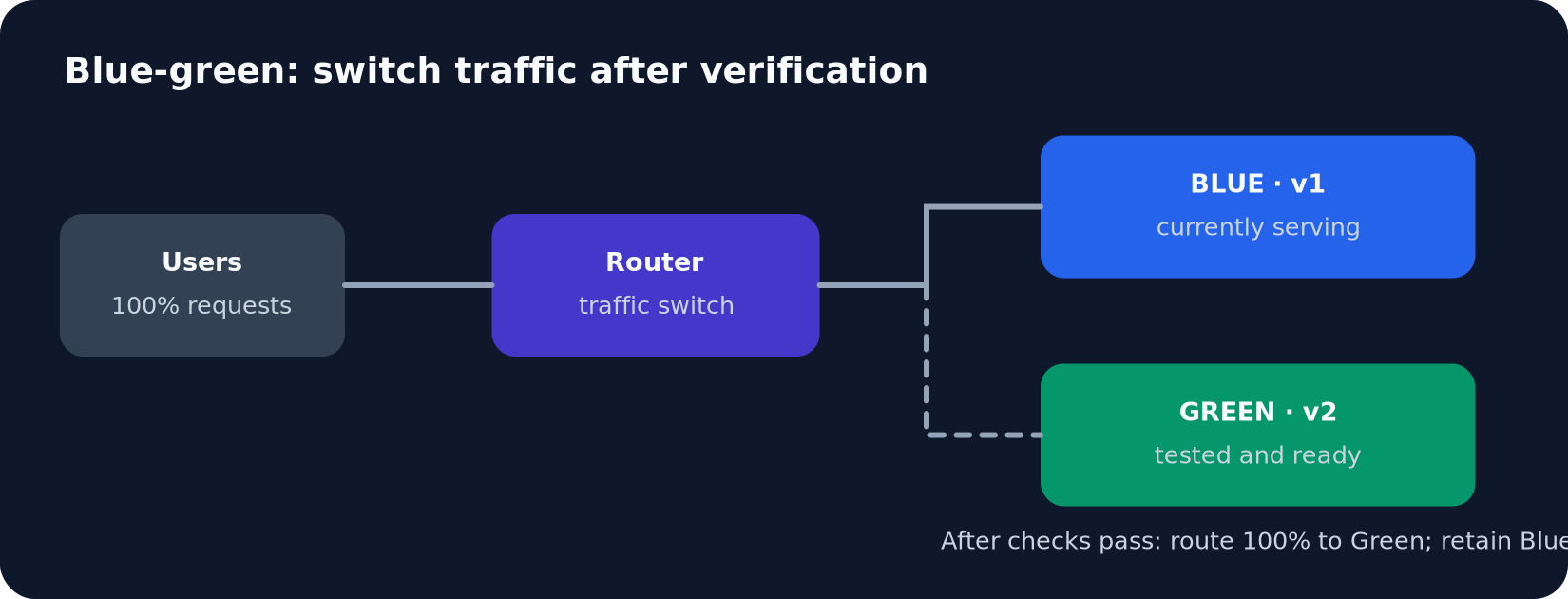
What a release looks like
- Keep Blue serving production traffic.
- Deploy the new version to Green.
- Run smoke tests, health checks, and relevant integration checks against Green.
- Shift traffic to Green and monitor key metrics.
- Keep Blue ready for a defined rollback window, then retire or reuse it.
Example: Your team is upgrading the runtime and major dependencies of an e-commerce backend. You want to validate the new stack in an environment close to production and retain the ability to switch traffic back quickly if latency spikes.
Why teams like it
Blue-green creates a clear cutover point and can make application traffic rollback very fast. It also allows meaningful verification before the new version receives normal production traffic.
What can go wrong?
Blue-green is not automatically zero-risk or zero-downtime. Long-lived connections, caches, session storage, DNS propagation, and load balancer behavior all affect cutover quality. Running two environments also costs more.
Most importantly, switching traffic back does not reverse a database migration or undo writes made by the new version. Your database changes must remain compatible, or you need a separate data recovery plan.
Choose blue-green when: Fast cutover and traffic rollback are priorities, and you can afford parallel production-capable environments.
4. Canary deployment: expose a small percentage first
A canary deployment introduces the new version to a limited portion of production traffic. If it performs well, you progressively increase its share.
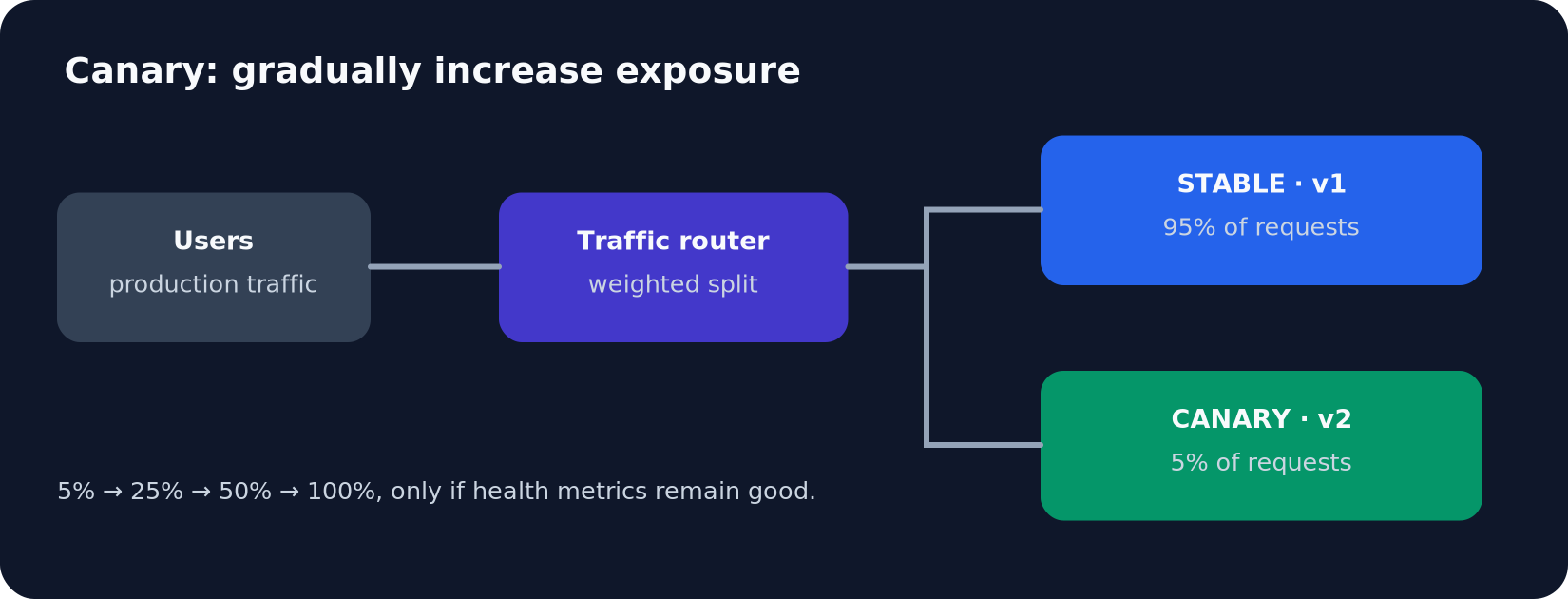
A rollout might look like this:
| Stage | New version traffic | Decision |
|---|---|---|
| Initial | 5% | Check crashes, errors, and latency |
| Expand | 25% | Compare against stable baseline |
| Expand again | 50% | Watch load-dependent behavior |
| Complete | 100% | Promote the release |
These percentages are illustrative, not a universal schedule. A payment service might use longer observation windows and smaller steps than a low-risk content API.
Example: You've rewritten the pricing calculation service. Unit tests pass, but you're concerned about unusual combinations of discounts and taxes. Route a small percentage of eligible requests to the new version and compare correctness and performance before increasing exposure.
Why teams like it
Canary releases reduce the blast radius of a bad change and provide evidence from real production conditions. Teams can pause or automatically roll back when predefined thresholds are exceeded.
What can go wrong?
Traffic percentage does not always equal user percentage. Sticky sessions, request frequency, and uneven customer behavior can skew exposure. Low-volume canaries may not generate enough data to detect regressions. You also need version-compatible databases and a reliable way to attribute metrics to each version.
For sensitive changes, monitor business outcomes, not only CPU usage and HTTP 500s. A pricing bug could return successful HTTP responses while charging incorrect amounts.
Choose canary when: The change is risky, the system has meaningful production traffic, and you have trustworthy telemetry and traffic controls.
5. Feature flags: deploy now, release later
Feature flags (also called feature toggles) wrap behavior in a condition that can be evaluated at runtime. The code may already be deployed, but the feature remains disabled until a flag allows it.
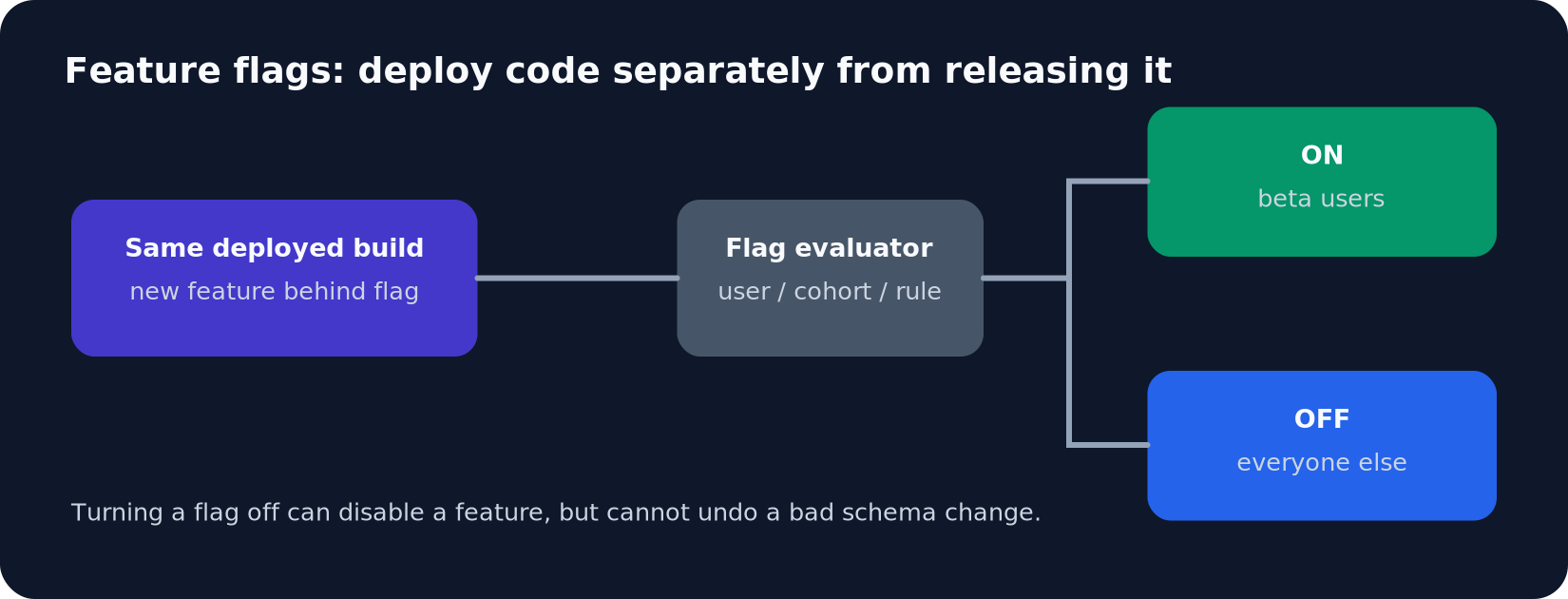
A simplified example:
const canUseNewCheckout = flags.isEnabled('new-checkout', {
  userId: user.id,
  country: user.country,
});

if (canUseNewCheckout) {
  return renderNewCheckout();
}

return renderExistingCheckout();
Example: Your team has built a redesigned checkout flow. You deploy the code behind a disabled flag, enable it for employees, then beta testers, and finally a percentage of customers. If conversion drops, you disable the feature without shipping another build.
Why teams like it
Feature flags decouple shipping code from exposing functionality. They make it easier to coordinate product launches, run controlled rollouts, and turn off problematic features quickly.
What can go wrong?
Flags add conditional paths and testing complexity. Old flags become technical debt. Teams need clear flag owners, expiration dates, sensible defaults, and a cleanup process.
A flag is not a universal rollback mechanism: disabling a UI path will not reverse database writes, schema changes, or external side effects that already happened. Security-sensitive permissions must also be enforced on the server, not only hidden behind a client-side flag.
Choose feature flags when: You want to control who sees a feature independently of when its code is deployed.
6. A/B testing: compare experiences, not just deployment health
A/B testing assigns users to different variants and measures the effect on a defined outcome. It often uses feature flags or experimentation infrastructure, but its primary goal is learning, not simply reducing deployment risk.
Example: Product wants to know whether a one-page signup form increases completion compared with the existing multi-step form. Assign users consistently to variants A and B, define signup completion as the primary metric, and monitor guardrails such as errors and latency.
How it helps: Teams can make product decisions using measured outcomes rather than opinions.
Watch out for: Changing group assignments mid-experiment, peeking at results without a statistical plan, and confusing a statistically significant result with a practically meaningful improvement.
Choose A/B testing when: You need evidence about which user experience performs better. Use canary deployment separately if the underlying code change also needs a safety rollout.
7. Shadow deployment: observe without serving the new result
With shadow traffic (also called traffic mirroring), production requests are copied to a new service or version, but only the existing production system's response reaches the user.
Example: You're replacing a search ranking service. Mirror search requests to the new service and compare latency, error rate, and ranking output while the current service continues to answer users.
How it helps: You can test against realistic request shapes and load without letting the candidate service determine user-visible responses.
Watch out for: Mirrored requests may trigger duplicate writes, payments, emails, or other side effects. Shadow environments should be read-only or carefully isolated, with appropriate privacy controls and data handling. Mirroring also increases load and infrastructure cost.
Choose shadow deployment when: You need realistic production validation of a backend, model, or infrastructure replacement before letting it serve responses.
8. Ring-based and regional deployments: expand by cohort or location
Ring-based rollouts move through progressively broader groups: internal users, early adopters, a small production cohort, and eventually everyone. Regional deployments use geography or infrastructure regions as the boundary.
Example: A globally distributed SaaS platform updates its authentication service in one lower-risk region first, observes it for a defined period, and then rolls out region by region.
How it helps: Teams can contain incidents to a known cohort or region, simplify incident investigation, and account for regional infrastructure differences.
Watch out for: Regions have different traffic patterns, compliance requirements, and dependencies. A healthy release in one region does not guarantee success everywhere. Shared global databases and services can also weaken regional isolation.
Choose ring-based or regional rollout when: You have multiple customer cohorts, tenants, or regions and need deliberate stages of exposure.
9. Progressive delivery: combine deployment, flags, and automated checks
Progressive delivery is a broader practice: expose a change incrementally, measure it, and advance or stop based on evidence. A typical setup combines a canary rollout, feature flags, observability, and automated analysis.
For example:
- Deploy a new service version with the feature flag off.
- Enable the feature for internal users.
- Route 5% of eligible production traffic to the new version.
- Compare error rates, latency, and checkout completion with the stable version.
- Expand only when predefined guardrails pass.
- Disable the feature or roll traffic back if a guardrail fails.
- Remove the temporary flag after the rollout is stable.
This is where deployment strategy becomes a repeatable team process, not a manual release-day ritual.
The part people forget: databases and backward compatibility
Application traffic can often be rolled back quickly. Data is harder.
Suppose version 2 renames a database column and version 1 still reads the old name. If you apply the rename before switching traffic, version 1 may break. If you roll back after switching, it may still be broken.
A safer approach is expand → migrate → contract:
- Expand: Add the new schema while keeping the old contract working.
- Migrate: Update applications and backfill data as needed; support old and new versions during the transition.
- Contract: Remove old fields or paths only after all consumers have migrated and the rollback window has closed.
The same principle applies to APIs, message formats, event consumers, and caches. If two versions can coexist safely, more deployment strategies become available to you.
How to make any strategy safer
Whatever strategy you choose, establish a few release habits:
- Define success before deploying. Know which technical and business metrics indicate a healthy release.
- Use readiness and liveness checks appropriately. Readiness controls whether an instance receives traffic; liveness determines whether it should be restarted.
- Set rollout gates. Decide how long to observe each stage and what triggers a pause or rollback.
- Practice rollback. Test the actual mechanism, including database and dependency assumptions.
- Keep releases small. Smaller changes are generally easier to understand, monitor, and recover from.
- Assign ownership. Someone should know who can pause the rollout, disable a flag, or declare an incident.
- Record what happened. Capture rollout timing, metrics, incidents, and lessons to improve the next deployment.
Putting it together: choosing a strategy for a checkout redesign
Let's say your team is launching a new checkout experience on a busy e-commerce site. The change includes a frontend redesign, a new pricing service, and a database migration.
Using only one technique would leave gaps:
- Database: Use expand–migrate–contract so both application versions remain compatible.
- Pricing service: Start with shadow traffic for correctness comparisons, then canary the new service with strict pricing and payment guardrails.
- Frontend: Deploy behind a feature flag and enable it for employees, then a small customer cohort.
- Experimentation: Once stability is established, use A/B testing to compare conversion rates if there is a genuine product question.
- Rollback: Prepare separate actions for traffic routing, feature flag state, and data issues.
Notice that these strategies are not competitors. They solve different parts of the release problem.
Final thoughts
The best deployment strategy is not the most sophisticated one. It is the one that matches the risk of the change, the architecture of your system, and your team's ability to observe and recover.
For many services, rolling deployments are a sensible starting point. Use blue-green when a fast environment cutover matters, canary when you want controlled exposure to real traffic, and feature flags when deployment and user-facing release should happen independently. Add shadow traffic, A/B testing, or regional rollouts when the problem specifically calls for them.
Above all, remember: deploying safely is less about making failure impossible and more about making failure small, visible, and recoverable.